Monday, September 10, 2007


How to enable your AppleTV as an Xgrid node
This procedure will show you how to setup you AppleTV as an Xgrid node. I'm not really sure why you'd want to do this, but this is proof-of-concept. There's not a whole lot of Xgrid-aware apps out there, but Techspansion's excellent video converter VisualHub is aware. (as is Final Cut- ed.)
Link
Wednesday, August 29, 2007
Quartz Composer built stereoscopic recorder
Here's a nifty OS X application that creates red/blue 3D movies using input from two firewire cameras (like the two iSight camera setup featured in Res magazine a while back.
Link
Link
Monday, August 27, 2007
Friday, August 24, 2007
Content-Aware Image Resizing
Yet another Siggraph video that blows my mind -- "Seam Carving for Content-Aware Image Resizing" by Shai Avidan and Ariel Shamir.
(via AE Portal News)
Part of what's so interesting is the idea of finding patterns in images/video that allow a system to be "content-aware". The use of edge detection to determine important vs. non important visual information reminds me of the process of analyzing time-sliced video footage to interpolate when cuts, dissolves, or wipes take place. Eddie Elliott has a great example of this on his website. Essentially, if you take all the frames of a video and place them back to back to make a cube, by looking at the sides of the cube you can see where a left to right wipe, a cut to different looking footage, or a cross dissolve take place. Someone told me a couple years ago about a company trying to refine the technique in order to create a software program that logged archived footage procedurally, rather than hiring someone to plod through hours of footage.
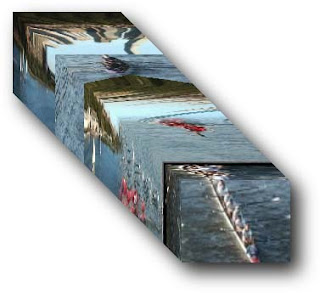
Image from Eddit Elliot's Video Streamer page. For more on time-slice/slitscan artworks, Golan Levin has a good archive here.
(via AE Portal News)
Part of what's so interesting is the idea of finding patterns in images/video that allow a system to be "content-aware". The use of edge detection to determine important vs. non important visual information reminds me of the process of analyzing time-sliced video footage to interpolate when cuts, dissolves, or wipes take place. Eddie Elliott has a great example of this on his website. Essentially, if you take all the frames of a video and place them back to back to make a cube, by looking at the sides of the cube you can see where a left to right wipe, a cut to different looking footage, or a cross dissolve take place. Someone told me a couple years ago about a company trying to refine the technique in order to create a software program that logged archived footage procedurally, rather than hiring someone to plod through hours of footage.

Image from Eddit Elliot's Video Streamer page. For more on time-slice/slitscan artworks, Golan Levin has a good archive here.
Tuesday, August 21, 2007
Thursday, August 16, 2007
Steve Jobs poo-poo's little plastic discs for video
During the iMac/iLife special event Steve Jobs introduced the iDVD part of the package with a dismissive "There are some people who still want to make DVDs." This followed a demonstration of some really nice HD web galleries being generated by iMovie. It's nice to know somebody that high up has caught on to the fact that locked-up oxidizing plastic discs that are illegal to copy are a bad way to hold video.
Panic's Steven Frank chimes in.
(p.s. I know I'll probably sound like an Apple shill for saying this, but I just got one of those new iMacs, and it's the nicest computer I have ever worked on, and that includes the quad Mac Pro I use at work. The glass front LCD and keyboard and overall zippiness of the machine just plain make me happy whenever I use it. I just put FCS 2, Logic Pro, and all my assorted free video transcoders on there and it positively sings.)
Panic's Steven Frank chimes in.
(p.s. I know I'll probably sound like an Apple shill for saying this, but I just got one of those new iMacs, and it's the nicest computer I have ever worked on, and that includes the quad Mac Pro I use at work. The glass front LCD and keyboard and overall zippiness of the machine just plain make me happy whenever I use it. I just put FCS 2, Logic Pro, and all my assorted free video transcoders on there and it positively sings.)
Monday, July 30, 2007
AppleTV hacking goes to the next level
What started out as a thread on the somethingawful forums has progressed into a veritible orgy of Apple TV hacking- Xvid support with Perian, external USB storage, bluetooth, people monkeying with the screensavers in quartz composer.. in fact so much is going on it's becoming difficult to track. Apple's YouTube update set hackers back a bit- it didn't shut them out completely, it just removed a lot of the superfluous bits of OS X that were making hacking in extra features so easy. Luckily AwkwardTV seems to be tracking the majority of the hacks and plugins as they spring up (after briefly being Digg'd into oblivion). I need another few hours to parse all this information before I start modding my AppleTV, but if it saves me all the time I've been spending transcoding XviD files, gives me subtitle support, and lets me play my HD files without waiting a whole week to convert them to a format that may or may not play on the AppleTV, I am there.
(There's a good compendium of command line hacks here as well, make sure to check whether or not they work after the YouTube update though.)
(There's a good compendium of command line hacks here as well, make sure to check whether or not they work after the YouTube update though.)
Wednesday, May 30, 2007

Monday, May 07, 2007
Create Digital Motion - Why I Want a Portable VHS Video Case, from Museum of Lost Interactions
Righteous commentary on CDM about a joke design for a portable VHS walkman, and how it would actually be a cool piece of equipment.
Link
Link
Friday, May 04, 2007
The Scanimate - 70's Analog electronic motion graphics!

Awesome page about the Scanimate- a scanner-analog video synth the size of a room that they used to do very early title animation and motion graphics- Think wiggling letters on The Electric Company and the opening title of Logan's Run.
The Scanimate is basically an analog computer connected to a scan converter. This means that high-contrast artwork is placed onto a light table under a "high rez" camera. In the late seventies, that meant it was about a 500 line vidicon camera, but was not interlaced video, for reasons I'll get into below.
The image then appeared on a "high rez" CRT, (cathode ray tube) which in turn was scanned by a regular monochrome NTSC video camera. The reason for this "re-scanning" is that the analog computer could do all sorts of wierd and wonderful things to the sweep on the CRT, thus animating the artwork. The only trick was that the "animator" actually had to "program" the move by wiring up a complex analog circuit and adjusting any (and sometimes all) of about 250 knobs. The wiring was done at several "patch panels" where you had access to the innards of the analog "CPU" waveforms. You had horizontal and vertical sawtooth waveforms, a variety of oscillators which could phase lock to the horizontal or vertical sweep or each other, and summing amps and multipliers. Ramp generators could be fired off in sync with a specific timecode on videotape, and each ramp could "multiply on" an oscillator, offset, or whatever you needed to wire up to "bend" the raster to the client's content.
The original raster could be "sectioned" so that if the artwork had up to five words, the words could be individually animated. The second camera's output (the one viewing the CRT) was colorized according to the greyscale values it saw, and that image could then be layered by keying it over videotape of previous "passes". The passes were recorded on 2" IVC helical analog video recorders, which could (sometimes) manage an embarrasing number of generations before the client noticed it. You could never get away with it when you needed to.
The client(s) would sit on couches at the rear of the room, and at least at Image West, there were two Scanimates, one on either side of the room. A video switcher and monitors were at the front of the room, and through a door were the video tape machines, which were 2,000 pound monsters that ran on megawatts of power and required compressed air.
Because the Scanimates produced output in "real-time", the clients could literally sit down and say things like "Make it move a little faster", or "Can you make it more of a teal color?", and the animators would tweak it, get an approval, tape it, and the guy would walk out with his master. It was hundreds of times faster than cel animation, and so $2,500/hour to command the entire facility was a bargain. If the client wanted something more complex, of course it took longer, and cost more. If he couldn't make up his mind, we could keep trying this and that, and he paid for his own indecision.
link
Thanks Jesus!
Thursday, May 03, 2007
Wednesday, April 25, 2007
Video to film- via inkjet printer!
A very cool hack that is surely the seed for a new product- A method of Transferring video to 16 or 35mm film using an inkjet printer.
Found Via BoingBoing
Found Via BoingBoing
Tuesday, April 17, 2007
HD For Indies - Final Cut Studio 2 details
Mike has more details about Apple's next generation production big-box than you'll know what to do with. Some things that excite me: The new color correction application that incorporates recently purchased Final Touch, Zspace animation and virtual cameras in Motion (I guess I don't need after effects any more) and "open format timelines", mix formats, resolutions, framerates, all in a timeline and it doesn't matter- it just works.
HD For Indies, nab 2007 notes from apple sunday press
HD For Indies, nab 2007 notes from apple sunday press
Wednesday, April 11, 2007
Run Lola, Ruuuuuuuuuuuuun! at daniel shiffman
Processing guru Daniel Shiffman has set up a system with thousands of 60x32 pixel cells, all playing Run Lola Run, each one frame ahead of the next, spread out across a bank of displays.
Check out the video.
Link
Check out the video.
Link
Monday, April 09, 2007
MAKE: Cellular automata video synthesizer kit & Videothing CONTEST!
We're so excited about the new video cellular automata kit from MAKE magazine, that we're going to hold a contest to see who can make the coolest implementation of it- bend, hack, unexpected use or just a sweet case design, the sky is the limit.. Get the kit here and send your entries (pics, video, descriptions!) to wiley at mediatronica dot com. *
The winner will be chosen by a panel of Video Thing participants and the prize is your choice of a neuros mp4 recorder or an elgato eyetv hybrid! The deadline for submissions is July 1st of this year.
(* this contest isn't sponsored or endorsed by Make magazine, but we love them and hope they will smile on it as a celebration of all things MAKE)
MAKE magazine Link
BoingBoing post about the kit
Wikipedia: Cellular Automata
The winner will be chosen by a panel of Video Thing participants and the prize is your choice of a neuros mp4 recorder or an elgato eyetv hybrid! The deadline for submissions is July 1st of this year.
From the Make page:We have a new kit for sale in the Maker store, the Cellular automata video synthesizer kit. This easy to contstruct kit is a fun way to play with cellular automata and video synthesis. When complete you will be able to uncover endless visual and sound patterns on any TV with a composite NTSC video input. The kit provides a pre-assembled, pre-programmed Video Critter Mini board, three potentiometers, and a push button. Just solder up the potentiometers and button to the circuit board, add an enclosure, and you're done!


(* this contest isn't sponsored or endorsed by Make magazine, but we love them and hope they will smile on it as a celebration of all things MAKE)
MAKE magazine Link
BoingBoing post about the kit
Wikipedia: Cellular Automata
Wednesday, April 04, 2007
Saturday, March 24, 2007
Thursday, March 22, 2007
QuickTime gains 720P Apple TV high-definition export mode
Looks like I'm going to get an Apple TV after all...
Link
In an undisclosed and largely unnoticed update to its QuickTime video playback and conversion software, Apple has quietly added an “Export to Apple TV” feature capable of creating high-definition videos viewable on the Apple TV accessory. Unlike Export to iPod, which currently creates sub-DVD-quality 640 by 480 videos, Export to Apple TV creates not only full DVD-quality 720 by 404 videos, but also 1280 by 720 videos. These videos are viewable in iTunes, but cannot be transferred directly via iTunes to an fifth-generation iPod.
Link
Subscribe to:
Posts (Atom)

